Our image to text converter lets you convert image into text in seconds and extract text from image (Free & Online)
Supported formats: PNG, JPG, WEBP, GIF, PDF and more.
Our image to text converter is an online tool that extract text from image hassle free. Upload your image/photo or paste URL in the tool. Press the “Convert” button to start the process and get extracted text within a few seconds in an editable (DOCx) file. Our OCR image-to-texttool uses advanced OCR technology to read every detail accurately, quickly, and securely.
It’s simple: upload your image(s) and leave the rest to our tool. Follow the steps to convert the any picture to text format online.
1. Upload your file from your local storage
2. After the image is uploaded click on the crop button or rotate image as per your requirement
3.Press the Convert button to start the process.
4. Copy or Download instantly or export your output for use in documents, notes, or data entry.
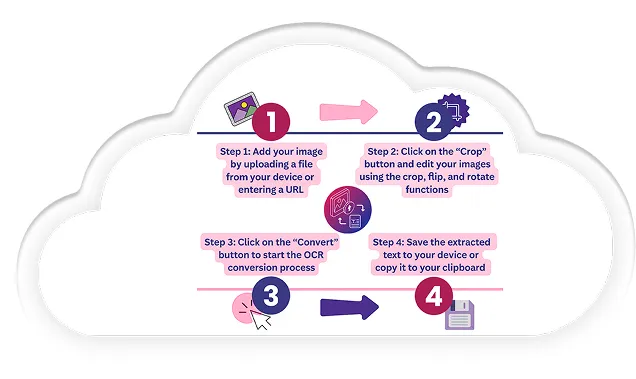
Let us walk you through each benefit led-by-an-example for clarity
You can simply take a quick photo of your class notes, upload it, and the text appears right away. Everything stays organized, and you move through your study routine with ease.
With the help of our PNG (Image) to text converter, copying text from screenshots becomes much simpler. Open your chat, capture the screen, upload it, and the tool gives you clean text instantly.
Our JPEG to text converter also supports you when you need text from documents or signs. You spot something important, capture it, upload it, and the tool gives you readable text you can save or reuse. This helps during travel, fieldwork, or busy moments when quick information matters.
Lets not forget the accessibility side. So yeah, if you prefer clear text that works with readers or digital tools, you upload your image and the converter gives you smooth, structured content. Everything feels way easier to understand and to use.
Our image to text converter is built with a clear purpose: to deliver fast, accurate, and flexible text extraction every single time.
Our image to text converter handles JPG, PNG, JPEG, Webp, GIF and HEIC and many more image formats at one place. Every Image Upload moves through the system smoothly, and our image to text converter delivers clean, Editable Text in DOCX format without any unnecessary steps.
Our photo to text converter reads handwritten notes with support from advanced OCR Technology. The AI Image Reader examines curves, strokes, and subtle details carefully to Extract text from image files that hold notes, reminders, or personal writing.
Our Picture to Text system understands multiple languages with confident accuracy. English, Arabic, Spanish, and several others pass through the Online OCR engine naturally, allowing the converter to process multilingual content without losing clarity or structure.
Our img to text process moves quickly and keeps tasks on track. Photos, screenshots, and scanned documents convert image to text within moments, creating a fast workflow that supports busy users effortlessly.
Our Picture to Text system understands multiple languages with confident accuracy. English, Arabic, Spanish, and several others pass through the Online OCR engine naturally, allowing the converter to process multilingual content without losing clarity or structure.
Image-to-text.me handles every image upload with security in mind. Files process inside a protected environment and clear responsibly after Text Extraction. Data stays private, and Copy and Paste results appear instantly without storage or sharing.
Here are some of the main use cases of our image to text converter, which you must know in order to grasp its importance in routine life.
Consider a moment when a printed article contains a line you want to save quickly. Why spend time typing it out? A simple capture enters the photo to text converter, and the text appears instantly in digital form. Save this data in your mobile within a few seconds.
You probably have a daily workload in an office environment. How often do documents require digitization for proper storage or sharing? You can simply enter the images of your documents into our img to txt tool online. It will give you searchable text within seconds.
Let’s say you are sitting in a lecture with content written faster than anyone can copy. Wouldn’t it help to secure everything neatly? All you have to do is capture a picture of the whiteboard or notebook and upload it to our tool. It will digitize your class notes right away.
During professional meetings, contact information often needs immediate digital access. Instead of retyping. A captured business card enters into our pic to text converter, and the text appears clearly formatted for saving. The shift encourages efficient communication.
Consider the time spent typing information from printed forms or tables. Could that process run better? An uploaded image activates extraction, and structured text appears prepared for processing. You’ll see how it ensures that your workflows are faster and have a higher level of accuracy.
Screenshots regularly hold captions, comments, or messages worth reusing. Why rewrite them manually? Upload your screenshot into our screenshot to text converter and press the convert button to start the process. Editable text appears in a clean format within a few seconds.
Upload your file in our image-to-text.me and the system generates editable text within seconds. No payments or sign-ups, just clean results ready to copy and use. Have a screenshot or a scanned page? The process works the same way.
First of all, use an image with clear text and proper visibility. Next, make sure the photo has balanced light without shadows or glare, since clear exposure improves character detection. After that, use a high-resolution capture so the system reads each detail accurately. Then crop irrelevant sections to keep the focus on essential text. Finally, keep the page straight and present readable handwriting or print.
The converter follows a structured OCR Technology pipeline. The image enters the system, the layout gets analyzed, characters get recognized through AI Image Reader models, and the final output appears as clean text. The entire process runs automatically, and the extracted text maintains structure and readability.
Handwritten content is supported. The converter studies curves, shapes, and strokes, then interprets them through the handwriting recognition model. Clear handwriting creates stronger output, but the system still reads most notes with reliable accuracy.